


Microsoft has introduced new Windows security mechanisms designed to hamper phishing attacks via Remote Desktop (.rdp) files. The system will now warn users of the risks when opening such files, and redirection of local resources to the remote host will be disabled by default.
RDP files are often used in corporate environments: administrators pre-configure them with connection settings for remote systems, including automatic redirection of local resources to the remote host. However, this same mechanism is actively abused by attackers. For example, the hacker group APT29 previously used RDP files to remotely steal data and accounts from their victims.
When a malicious .rdp file is opened, the victim's device silently connects to the attackers' server and shares local drives. As a result, attackers gain access to files and credentials stored on the drive, can intercept clipboard contents (including passwords), and redirect authentication mechanisms such as smart cards or Windows Hello to impersonate the user.
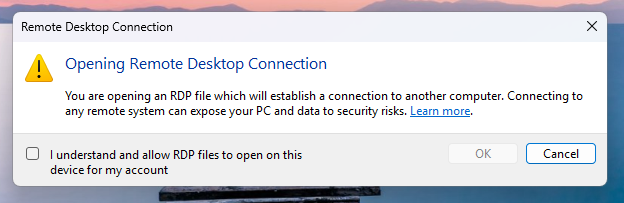
The new protections were included in the April cumulative updates for Windows 10 (KB5082200) and Windows 11 (KB5083769 and KB5082052). The first time an RDP file is opened after installing the patch, the user will see a training window explaining the format and the risks associated with it. To prevent the warning from appearing again, confirm that you understand the risks and click "OK."
Subsequent attempts to open an .rdp file in Windows will display a special dialog before establishing a connection. It indicates whether the file is signed by a trusted publisher, displays the address of the remote host, and lists all options for redirecting local resources (drives, clipboard, devices). By default, all options are disabled.
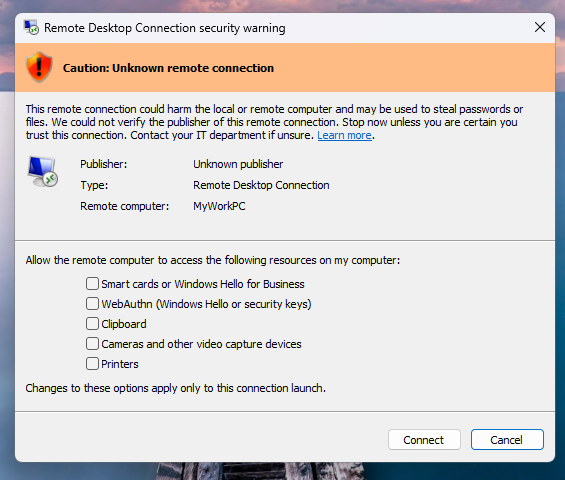
If the file doesn't have a digital signature, Windows will display the warning "Caution: Unknown remote connection" and mark the publisher as unknown (in this case, it's impossible to verify who created the file). If the signature is present, the system will display the publisher but still advise the user to verify its legitimacy before establishing a connection.
Microsoft specifically emphasizes that the new mechanisms only work when opening RDP files. Connections initiated directly through the Windows Remote Desktop client are not protected.
If necessary, administrators can temporarily disable the new checks by changing the RedirectionWarningDialogVersion value to 1 in the registry key HKLM\Software\Policies\Microsoft\Windows NT\Terminal Services\Client. However, given the frequency with which RDP files are used in attacks, Microsoft strongly advises against this.
RDP files are often used in corporate environments: administrators pre-configure them with connection settings for remote systems, including automatic redirection of local resources to the remote host. However, this same mechanism is actively abused by attackers. For example, the hacker group APT29 previously used RDP files to remotely steal data and accounts from their victims.
When a malicious .rdp file is opened, the victim's device silently connects to the attackers' server and shares local drives. As a result, attackers gain access to files and credentials stored on the drive, can intercept clipboard contents (including passwords), and redirect authentication mechanisms such as smart cards or Windows Hello to impersonate the user.
The new protections were included in the April cumulative updates for Windows 10 (KB5082200) and Windows 11 (KB5083769 and KB5082052). The first time an RDP file is opened after installing the patch, the user will see a training window explaining the format and the risks associated with it. To prevent the warning from appearing again, confirm that you understand the risks and click "OK."
Subsequent attempts to open an .rdp file in Windows will display a special dialog before establishing a connection. It indicates whether the file is signed by a trusted publisher, displays the address of the remote host, and lists all options for redirecting local resources (drives, clipboard, devices). By default, all options are disabled.
If the file doesn't have a digital signature, Windows will display the warning "Caution: Unknown remote connection" and mark the publisher as unknown (in this case, it's impossible to verify who created the file). If the signature is present, the system will display the publisher but still advise the user to verify its legitimacy before establishing a connection.
Microsoft specifically emphasizes that the new mechanisms only work when opening RDP files. Connections initiated directly through the Windows Remote Desktop client are not protected.
If necessary, administrators can temporarily disable the new checks by changing the RedirectionWarningDialogVersion value to 1 in the registry key HKLM\Software\Policies\Microsoft\Windows NT\Terminal Services\Client. However, given the frequency with which RDP files are used in attacks, Microsoft strongly advises against this.