


Well, we should sanitize our HTML! Angular provides us with a library called DomSanitizer as a part of its platform-browser module. We can import it in our component.ts file like this:
import { DomSanitizer } from "@angular/platform-browser";
Create a reference of it inside our constructor:
We can now use DomSanitizer to sanitize any HTML according to a specific rule. Since we want to sanitize an HTML URL, we can use the SecurityContext module from the Angular core module.
import { SecurityContext } from '@angular/core';
Finally, we can now sanitize our URL like this:
url: string =this.DomSanitizer.sanitize(SecurityContext.URL, 'javascript:alert("you are hacked ")';
And now if you try to click the link, the alert should not appear. If you head over to the console, you’ll see something like this:
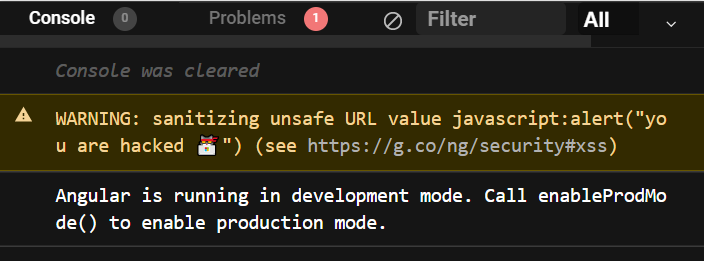
The warning you’ll see after sanitizing.
That’s how you can sanitize your unsanitized HTML in your Angular + TypeScript applications to safeguard such use cases against lethal XSS attacks.
import { DomSanitizer } from "@angular/platform-browser";
Create a reference of it inside our constructor:
constructor(
...
private DomSanitizer: DomSanitizer,
...
)
{}
We can now use DomSanitizer to sanitize any HTML according to a specific rule. Since we want to sanitize an HTML URL, we can use the SecurityContext module from the Angular core module.
import { SecurityContext } from '@angular/core';
Finally, we can now sanitize our URL like this:
url: string =this.DomSanitizer.sanitize(SecurityContext.URL, 'javascript:alert("you are hacked ")';
And now if you try to click the link, the alert should not appear. If you head over to the console, you’ll see something like this:
The warning you’ll see after sanitizing.
That’s how you can sanitize your unsanitized HTML in your Angular + TypeScript applications to safeguard such use cases against lethal XSS attacks.