


- Messages
- 4,003
- Likes
- 1,873
- Points
- 2,130
The 1Password password manager now features built-in protection against phishing URLs. The service now warns users about suspicious pages, preventing potential login data leaks.
Like other similar tools, 1Password doesn't automatically fill in login and password information if the website URL doesn't match the one stored in the vault. However, this basic anti-phishing protection isn't always effective, as users don't always notice the trick.
Specifically, in typosquatting, attackers might register the domain githuh.com or githubb.com instead of github.com. If such a page appears convincing, users assume the password manager is simply malfunctioning or the vault is locked, and enter their credentials manually.
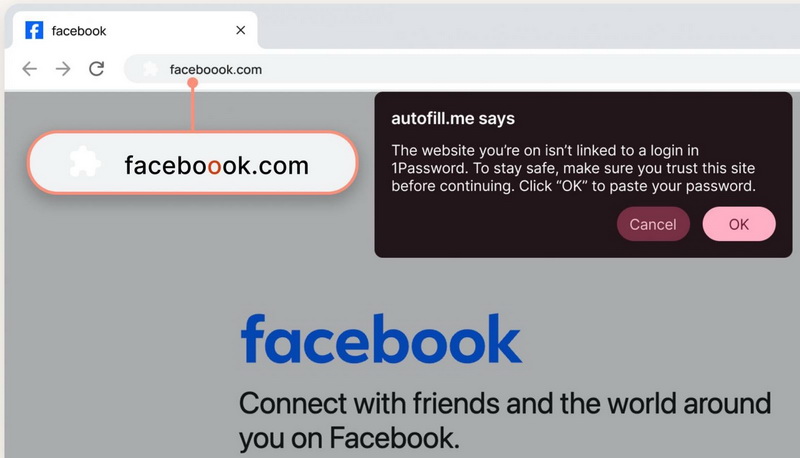
To protect users in such cases, 1Password is implementing an additional layer of protection. Now, when attempting to log in to a suspicious website, a pop-up window will appear warning about potential phishing.
This new feature is automatically enabled for users on individual and family plans. In the enterprise segment, administrators can enable it manually in the Authentication Policies section of the 1Password administrative console.
The company notes that it recently conducted a survey on phishing among 2,000 users in the US. The results were disappointing:
Like other similar tools, 1Password doesn't automatically fill in login and password information if the website URL doesn't match the one stored in the vault. However, this basic anti-phishing protection isn't always effective, as users don't always notice the trick.
Specifically, in typosquatting, attackers might register the domain githuh.com or githubb.com instead of github.com. If such a page appears convincing, users assume the password manager is simply malfunctioning or the vault is locked, and enter their credentials manually.
To protect users in such cases, 1Password is implementing an additional layer of protection. Now, when attempting to log in to a suspicious website, a pop-up window will appear warning about potential phishing.
This new feature is automatically enabled for users on individual and family plans. In the enterprise segment, administrators can enable it manually in the Authentication Policies section of the 1Password administrative console.
The company notes that it recently conducted a survey on phishing among 2,000 users in the US. The results were disappointing:
- 61% of respondents have fallen for phishers’ bait at least once;
- 75% don't check the URL before clicking a link;
- a third of employees in corporate environments use the same passwords for work accounts (and almost half of them have been victims of phishing);
- 72% admitted that they had clicked on suspicious links at least once;
- More than 50% believe that deleting a suspicious email is easier than reporting it to the IT department.