

- 967
- 261
Microsoft experts warned about the StegoAd malware campaign , whose operators distributed malware through the official Edge extension store. The malware hid within ordinary images and font files and only activated several days after installation. The extensions committed ad fraud, stole credentials, and were capable of remotely executing JavaScript in victims' browsers.
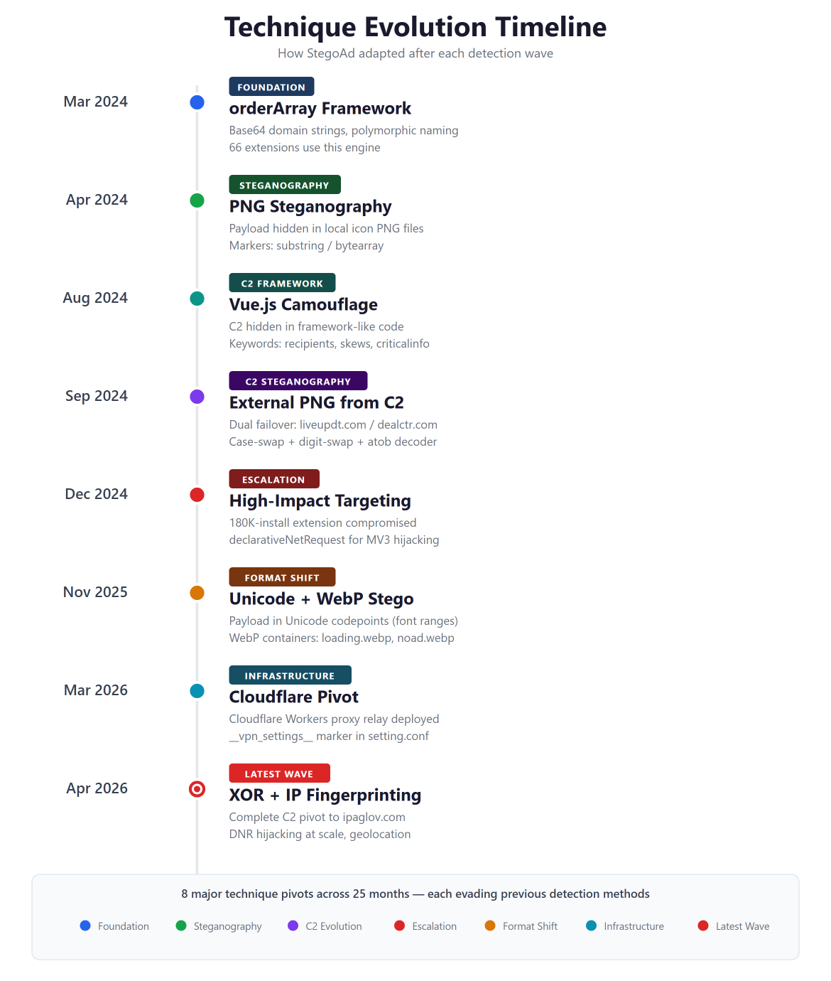
The name StegoAd refers to steganography—the concealment of data within ordinary files. The initial versions of the malicious extensions appended JavaScript after the IEND marker in PNG icons. Images continued to display normally, and security solutions were unaware of the hidden code.
Researchers linked 119 extensions, published under more than 90 developer accounts, to this campaign. These included ad blockers, VPNs, translators, and video downloaders. All the extensions performed their stated functions, received positive reviews, and showed no suspicious activity for a long time.
The total number of extension installations was approximately 2.6 million, but Microsoft emphasizes that this is not an exact figure for the number of affected users. Some malware variants were activated on only 10% of devices, undergoing server verification and a multi-day pause before launching.
Over time, the attackers shifted from hiding malicious code in PNG to using WebP and WOFF2 fonts, disguising the payload as Asian characters and service metadata. Some extensions downloaded seemingly ordinary images from the hackers' command-and-control server, then decrypted them using case-shifting, digit substitution, Base64, and XOR. The extension then checked the received code against the signature and launched it only after a successful verification.
The attackers' command-and-control servers returned the required files only in response to requests with a matching fingerprint and User-Agent. Researchers who accessed the infrastructure directly saw only an empty "stub." The extensions also checked whether developer tools were open in the browser and, if any analysis attempts were detected, went into sleep mode.
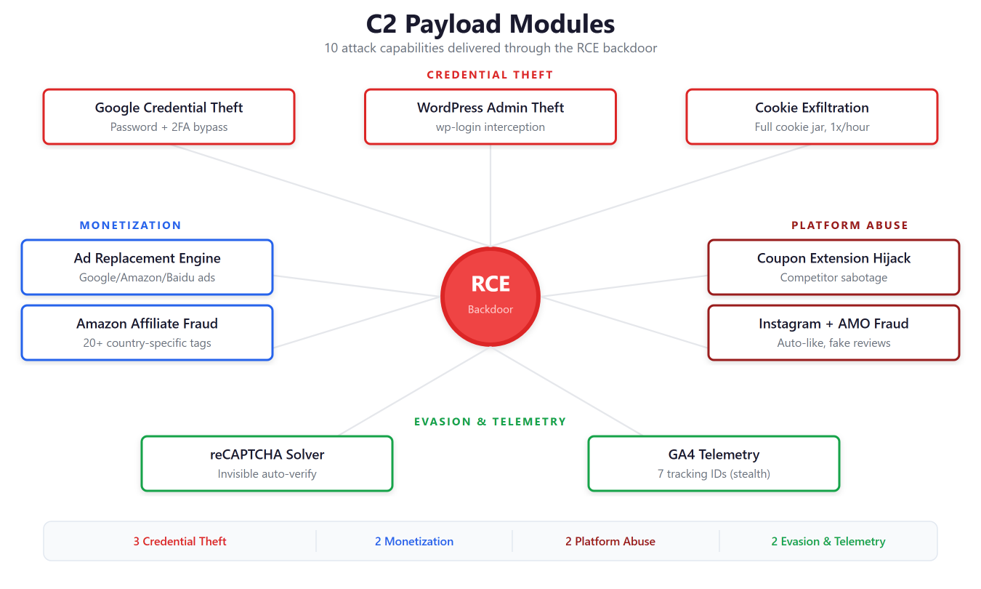
Experts write that StegoAd extensions were primarily used to spoof search results, inject ads, and intercept affiliate links to Amazon, eBay, and AliExpress to generate commissions. However, some payloads contained more dangerous features. For example, the malware could intercept Google credentials and two-factor authentication codes, steal WordPress administrator logins and passwords, and mass-steal cookies to hijack sessions. Furthermore, a backdoor embedded in the extensions allowed arbitrary JavaScript, obtained from the hackers' server, to be executed in the victim's browser.
According to researchers, the attackers' infrastructure included more than ten C&C domains with automatic failover, traffic was redirected through Cloudflare Workers, and GitHub Pages were used to host beacons. Moreover, at one point, the attackers even migrated from Manifest V2 to Manifest V3.
All 119 extensions have now been removed from the official store, and the accounts associated with them have been blocked. Users are advised to check the list of installed add-ons at edge://extensions. If the browser automatically removes one of the StegoAd extensions, it should be considered compromised. Victims are advised to change their Google, WordPress, banking, and other important account credentials, check their login history, and enable two-factor authentication.
The name StegoAd refers to steganography—the concealment of data within ordinary files. The initial versions of the malicious extensions appended JavaScript after the IEND marker in PNG icons. Images continued to display normally, and security solutions were unaware of the hidden code.
Researchers linked 119 extensions, published under more than 90 developer accounts, to this campaign. These included ad blockers, VPNs, translators, and video downloaders. All the extensions performed their stated functions, received positive reviews, and showed no suspicious activity for a long time.
The total number of extension installations was approximately 2.6 million, but Microsoft emphasizes that this is not an exact figure for the number of affected users. Some malware variants were activated on only 10% of devices, undergoing server verification and a multi-day pause before launching.
Over time, the attackers shifted from hiding malicious code in PNG to using WebP and WOFF2 fonts, disguising the payload as Asian characters and service metadata. Some extensions downloaded seemingly ordinary images from the hackers' command-and-control server, then decrypted them using case-shifting, digit substitution, Base64, and XOR. The extension then checked the received code against the signature and launched it only after a successful verification.
The attackers' command-and-control servers returned the required files only in response to requests with a matching fingerprint and User-Agent. Researchers who accessed the infrastructure directly saw only an empty "stub." The extensions also checked whether developer tools were open in the browser and, if any analysis attempts were detected, went into sleep mode.
Experts write that StegoAd extensions were primarily used to spoof search results, inject ads, and intercept affiliate links to Amazon, eBay, and AliExpress to generate commissions. However, some payloads contained more dangerous features. For example, the malware could intercept Google credentials and two-factor authentication codes, steal WordPress administrator logins and passwords, and mass-steal cookies to hijack sessions. Furthermore, a backdoor embedded in the extensions allowed arbitrary JavaScript, obtained from the hackers' server, to be executed in the victim's browser.
According to researchers, the attackers' infrastructure included more than ten C&C domains with automatic failover, traffic was redirected through Cloudflare Workers, and GitHub Pages were used to host beacons. Moreover, at one point, the attackers even migrated from Manifest V2 to Manifest V3.
All 119 extensions have now been removed from the official store, and the accounts associated with them have been blocked. Users are advised to check the list of installed add-ons at edge://extensions. If the browser automatically removes one of the StegoAd extensions, it should be considered compromised. Victims are advised to change their Google, WordPress, banking, and other important account credentials, check their login history, and enable two-factor authentication.